Showing posts with label Mouse-Gadgets. Show all posts

Thursday, November 3, 2011

USB Mouse

USB Mouse with VoIP technology

We review some recent VoIP enabled devices. Where phones have this technology, mice and other accessories. Here is another accessory that can be used as a phone when talking through Skype.You do not see very often these devices in stores because they are not very popular. However, this could be one of the best. This is the VM-01L from Skype-a. Can be used as a normal mouse and turn it into a flip open phone only.When open lid becomes a regular phone that has all the features of the phone. There are even keys and you can dial in to play their favorite game.

This mouse is different and is much more sophisticated than I've ever seen before. In addition, VoIP technology has built in some features that I like to use.

1. It has a TFT screen has a resolution of 128 x 64 pixels, where you can see all the information you need. It is very convenient because you can see who is calling when watching a video or work in some of the graphics when you do not see the notification on the computer screen.

2. USB cable is 1.5 meters long. I use USB 1.1, however, is still sufficient for the mouse and phone functions.

3. What I like about the mouse's optical sensor resolution. It is 1000 dpi, which is good enough for a mouse and, especially, a mouse like this.

4. What I like about this gadget is that you can connect headphones with 2.5 mm microphone and talk with anyone still have the mouse pointer on the table. This is very convenient because if not this technology you have to buy another mouse or wait at the end of the talk if you want to do something on your computer while talking.

This mouse is not large and its shape is done in the classic style so no surprises here. Its dimensions are 55 mm x 105 mm x 33 mm. It's smaller than my regular mouse at home. And weighs 85 grams so it's amazing lighter after a cell phone.
You can buy this mouse for about $ 40 รข € "$ 50 and I'm glad I bought one.

Moldable mouse

Moldable mouse wins Red Dot

There is no doubt that the mouse is a very important device for all PC users. Because of this every one must be very careful when choosing a mouse. As designers and manufacturers have to do it so that it can to ensure the most efficient, comfortable and safe. An attempt to know all these points are made by designers moldable mouse.

The moldable mouse concept designed by Lite-On Technology and P & C Design Center has won the red dot award: design concept 2007 in the category Productivity and Labor. Light is made of clay and covered with nylon and polyurethane fabric blends, and users can amass in different ways they like. Most high-tech counterparts claim to be ergonomic, but if you ask people who spend all day sitting at a computer, you'll know it's not exactly true.

Moldable Mouse gives a bit of fun and play in the process of computation. On a more serious note, by allowing a wide variety of hand positions when holding the mouse reduces repetitive motions of the same position, thus minimizing the possibility of mouse-related injuries common as carpal tunnel syndrome . The click buttons and touch pad mouse scroll molded parts are attached to a feature of RFID (Radio Frequency Identification Device), which can be repositioned for maximum comfort.

Therefore, it is difficult to imagine a device that would be more ergonomic than this mouse. It's always a pleasure to read about these wonderful devices significantly improve our life activity.

Num Pad Mouse

Sometimes the computer-themed devices may be curious. Because this device, which is a hybrid of mouse and keypad. This interesting solution for users num pad makes your life easier.

There is no need to get your hand off the mouse to write some numbers or mathematical expressions simple - all the necessary buttons are already present in the mouse. Help in the calculations, or even play - why not use these buttons to link the actions of a game for them? Not sure how they would be pressed, however, but with proper training that can be pressed with the palm, I think. Training is also necessary to prevent accidentally push the button when you are in a fight.

This gadget can be very useful for people who use a calculator a lot, and skilled players that can use additional buttons as a useful bonus. For the casual PC users, this is just a curious consequence of how a cross between the keyboard and mouse might seem.

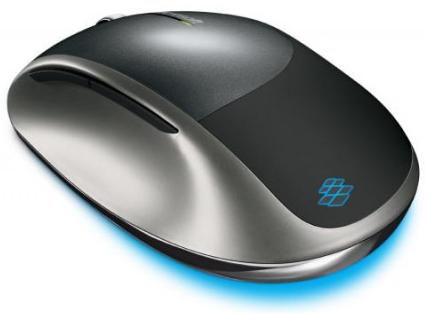
Microsoft Explorer Touch Mouse

Microsoft Explorer Mouse Touch

Ah, yes. It's a good old input device. How can we live without it? The brilliant thing has been gathering dust on our desks for decades. But as technologies progress, so that our pets plastic. Today, manufacturers produce many types of mice: games, designers and 3D mice, for example. It is also a mid-range category, for ordinary users. So let's take a look at new products from Microsoft: Microsoft Explorer Mouse Touch. Black looks brilliant style, nothing special, but classy enough. The house is repeated shaking his hand, to make it more comfortable to use. The mouse is cordless and features BlueTrack technology, so the problem of finding a suitable surface for the mouse is gone.

Innovation is very useful for laptop owners as well. The following article is a touch strip displacement, allowing you to scroll both vertically and horizontally. And that's not all, the device has five customizable buttons. Therefore, if you are in need of the entire surface of the touch pad with scroll bar, this is your best option. As Microsoft says, the battery charge is sufficient for 18 months of work. That's pretty good for a wireless device.

The advertised price of the mouse is $ 49.95 and will go on sale in September 2011 and will be available in four colors: Carbon Black, Storm Grey, Sangria Red and rust.

Inflatable Mouse

The number of portable devices is so great that it sometimes seems that it is nothing to be lower. However, creative designers think that even mobile devices can become much smaller. Do you? Have you ever thought that a mouse can be even more portable?

A new design of the mouse has recently offered. This gadget is called Jelly Click takes mouse portability to the extreme. All electronic circuits on a small board life and flexible. The body is soft plastic. When the concept is inflated like a normal mouse. But you can let the air out and roll up the gadget. Therefore, whenever you need the mouse, just inflate, connect the USB cable and enjoy using it. It is quite understandable that an event of such a structure has some important advantages. First, it would be almost impossible to do any damage to the device because it is very light. Another advantage is the fact that due to the material used this mouse is waterproof. What can be used even in extreme conditions.

In my view, this gadget represents a successful attempt to use the combination of portability, strength and originality. However, taking into account the fact that everyone is accustomed to using normal mouse would probably be, at least at first, strange to use this gadget.

V 470 Mouse

Logitech V 470 Mouse for Notebooks 

Logitech have come up with a new mouse specially designed for laptops. Is supposed to be most useful laptop mouse as it uses Bluetooth technology. Yes, they dropped RF connectivity for Bluetooth, and added some unusual features for a portable mouse. One of the first differences and the best of the new mouse is 470 V which does not use RF connectivity. If your notebook has integrated Bluetooth, and most of them have, you will be able to use this mouse without keys. The user does not have to worry about carrying the bag with him wherever he goes, which can be a pain if you forget to take with you. V 470 has Bluetooth 1.2 and special laser to track the precise movements.

In addition to Logitech V 470 mouse has an unusual feature. Side to side scrolling plus zoom allows the user to zoom in or out the documents in an instant. This function is useful when you are on a trip or just use your laptop on the move.

The mouse works on a single battery and has a power consumption rate very low. Logitech has been assessed to be held about four months on one battery. After that you can replace or buy a rechargeable battery. However, if you're using your laptop more than 8 hours a day battery life is reduced to about 3 months.Logitech V 470 mouse hit the market in September. Expect to come out, as it is a good laptop mouse. The price is $ 49.99 each.

EMS Muscle Mouse

EMS Muscle Mouse - relaxation with electrical muscle stimulation

Could you imagine using a mouse whimsical mouse is a combination of massage? This is not a joke, because this mouse comes with EMS super feet to massage the muscle electrical stimulation. You surprise me if friend asked about who is given a massage. This multi-function mouse muscle EMS is not capable of functioning as a pointer. The true electrical muscle stimulator is capable of operating as a mouse pad has two belt anywhere in the body under stress. Offered by Thanko, the USB Optical Mouse comes standard with a resolution of 800 dpi.

To make it work, you must connect the keyboard to the EMS. The EMS system will work in partnership with the mouse operation. Its two buttons one of which is at the bottom and is designed for on / off of the EMS, while the second button on the top is to keep control of three modes of simulation.In addition, you will be able to adjust the simulation through plus and minus switches placed on the side of the mouse. You can also find a lot of fun to work with this mouse. If you are prone to forget things, here is a special feature for you to make your mouse muscle EMS one hour off in case you forgot.

This handy device is powered by the USB port of your PC. In addition to the two pads, there is a case pad and the pad cable. EMS is also known as EMG stimulation and can be applied during the training session or as a therapeutic. If you are not indifferent to the shape of your body, you can easily tone with this intelligent massage machine exercises the muscles while relaxing stressed areas of your body. If you are a heavy user of computer, this device seems to be a health solution for you spine pain relief potential.

This mouse muscle EMS is not recommended for use if you are pregnant, diabetic, have heart problems or high blood pressure, have metal plates or pins in your body or cancer pain. Rate this mouse muscle sampling EMS is 6500fps. EMS Muscle Mouse has a blue LED light placed on the wheel and weighs 150 g. This mouse muscle measures 114, 5 x 63, 5 x 35, 5 mm. Often the lack of physical exercise, but this intelligent mouse is able to bridge the gap and make our body totally relaxed.

Saturday, October 29, 2011

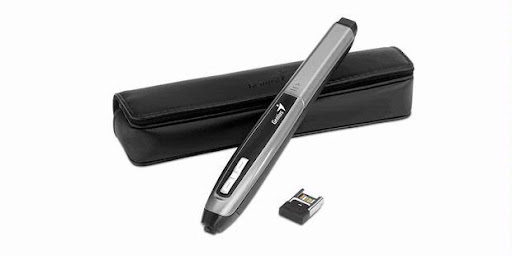
Pen-shaped wireless mouse


No need to explain the importance of a mouse as a control device for any PC user. It's hard to imagine that there may be an alternative to this device well known that we used to. However, there is the fact that the traditional form of the mouse is the most convenient and efficient. Therefore, some designers believe that it is possible to change the shape of the mouse is.

The gadget offers a wireless mouse looks like a pencil. In fact, this device operates as a single pencil simple, so lets put everything you want, but when disconnecting the receiver and insert it into the USB port, the stylus becomes a wireless mouse. What functionality and portability of the concept represents its main advantages compared to normal mice.

It has three buttons on the side of the row. So the user can have the three buttons to use. However, it has a scroll wheel, which reduces their usefulness.

I have no doubt that this gadget is great for browsing, but if you deal with graphic design or something, probably will encounter some problems, at least in the first script. No information available about refillable cartridges, but I hope that the pen comes with them, because otherwise it would be a waste of money to buy a new unit every time you need it. However, it is a decent enough idea, which most likely will have its defenders.

Calculator Mouse

Canon X Mark I Calculator Mouse

Today Canon has announced the first mouse-hybrid calculator. The keypad of this gadget represents the numeric pad time lost laptops or portable keyboards. Mouse itself is a Bluetooth 2.0 wireless technology laser mouse with three buttons on top, plus a scroll wheel. Number keys can also be used to enter numeric data, but only with a particular application. The shape is not very comfortable, but do not have much choice if you want this type of hybrid. Built-in calculator works pretty well and quickly. Counters I am sure you will find this very useful gadget. Mouse works in a couple of AA batteries, making it even more convenient.

The device is to be launched in August-September. The initial price will be $ 60 or White or Black versions. The same day, Canon has announced a full-size Bluetooth calculator, the X Mark I keyboard. Maybe I'm missing something, but I see no logic in this. Why buy a mouse, calculator, which is not very convenient as a mouse, when a Bluetooth Full-size calculator?

Well, this is just my personal opinion. Anyway, this will be a good offices gadget well worth the money sixties.

G105 Keyboard and G9x Laser Mouse

Keyboard and Mouse Logitech Laser G105 G9x

Logitech has introduced a version of Logitech Gaming Keyboard and Laser Mouse G9X G105, which according to the manufacturer, designed specifically for use with Call of Duty: Modern Warfare 3.

G105 Gaming Keyboard Keyboard Logitech company calls "the official keyboard Call of Duty:. Modern Warfare 3" A special feature of this product is its green LED backlight ("the spirit of military night vision devices") and the presence of six key programmable, each of which has three states, depending on the selected mode. These keys allow users to configure up to 18 macros "on the fly."

The keyboard can also detect up to five keystrokes pressed simultaneously. There are buttons to adjust volume and control media player and a switch that locks the Windows shortcuts and context menu.

G9x Laser Mouse

Logitech laser mouse able to track the travel speeds up to 2.4 m / sec G9X. You can choose the resolution 200-5700 dpi. Mouse connects via USB, with sampling frequency - up to 1000 Hz Mouse weight can be adjusted for maximum comfort and precision, which also features backlit with color-changing lighting.

Sales of Logitech Gaming Keyboard G105 will begin in October for about $ 80, Logitech Laser Mouse G9X will be in November and will cost $ 100.

Tag Cloud

More Details here
Blogger Widgets